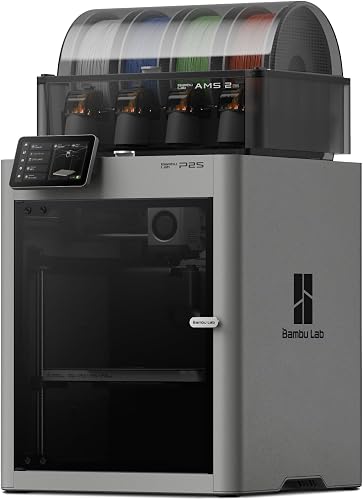
The Bambu Lab P2S Combo is the printer that tops our ranking because it balances capability and simplicity better than anything else on the list. It is an enclosed CoreXY machine with a 10-inch cube of build space, and the Combo version adds the AMS 2 Pro, Bambu Lab’s four-spool multicolor system with built-in filament drying. It is the successor to the popular P1S, and Bambu Lab calls it a completely reengineered version of that line.
This profile uses the maker’s published specifications and sets them against how people actually use a printer at home or in a small shop. We do not test products, so we only give figures that Bambu Lab publishes, and where a figure is missing we say so. For the full lineup, see our ranking of the best 3D printers of 2026.
Who the Bambu Lab P2S Combo Is For
This printer suits someone who wants a reliable, enclosed machine and does not want to spend weekends tuning it. Think of a hobbyist who prints household fixes, cosplay props, organizers and gifts. Think of a parent or teacher who wants a printer that mostly runs on its own. Think of a small seller who prints a few products and wants multicolor without hand-swapping filament.
The enclosure matters more than it first appears. A closed chamber keeps heat steady, which helps filaments that curl or crack in a drafty room, and it keeps small fingers and pets away from a moving toolhead. If you have only used an open-frame printer, the difference in consistency is the main reason people step up to an enclosed model like this one.
Key Specs, According to Bambu Lab
Here is what Bambu Lab publishes on the pages we opened:
- Build volume: about 10 × 10 × 10 in (256 mm per side).
- Maximum nozzle temperature: 572 °F (300 °C).
- Maximum heated bed temperature: 230 °F (110 °C).
- Camera: 1080p live view with enhanced LED lighting for clearer video and timelapses.
- Screen: a 5-inch touchscreen running a second-generation interface.
- Hotend: a quick-swap nozzle design with a one-clip mechanism that releases the nozzle and heatsink assembly without wiring connections. The default nozzle is 0.4 mm, and 0.2, 0.6 and 0.8 mm nozzles are also supported.
- Filament cutter: built in.
- Airflow: an Adaptive Airflow system with a flap, a carbon filter and cool outside air for low-temperature materials.
Bambu Lab’s page we opened does not list a top print speed or a noise figure for the P2S, so we will not quote one. If speed or noise decides your purchase, check the maker’s full specification sheet.
The AMS 2 Pro: Multicolor and Drying
The Combo includes the AMS 2 Pro, a four-spool system that feeds the printer and lets one print use several colors or materials. According to Bambu Lab, it offers enhanced filament drying through an active venting system that dries filament 30% faster than sealed heating.
Dry filament is not a luxury. Many filaments absorb moisture from the air, and wet filament leads to stringing, rough surfaces and weak parts. Having the dryer attached to the feeder is convenient, especially for nylon and PETG. In a humid climate it can save a lot of wasted prints.
There are trade-offs. Multicolor printing purges a little filament at every color change, so a model with many color switches produces more waste than a single-color print. The unit also sits beside or above the printer and needs desk space and a clear path for the filament tubes. If you only ever print one color, the standalone P2S costs less, but you give up the drying and the multicolor capability.
Materials and Temperature Limits
Bambu Lab says the P2S suits both low-temperature materials and high-performance, warp-prone filaments. In everyday terms, PLA and PETG are the easy ones and the usual starting point. ABS and ASA are the materials people choose for parts that must survive heat or sunlight, such as car interior pieces or outdoor brackets, and they benefit from the enclosed chamber.
The 572 °F (300 °C) nozzle limit is the main ceiling. Very high-temperature engineering filaments need hotter hotends, which is the territory of printers such as the Bambu Lab H2D AMS Combo. For most home projects, 572 °F is plenty.
Noise, Fumes and Indoor Use
Any 3D printer is a small appliance that runs for hours, so where you put it matters. Bambu Lab did not publish a noise figure on the pages we opened. Printers of this type generally have audible fans and motion, so a spare room, office or garage corner is more comfortable than a bedroom.
On fumes, be honest with yourself. PLA is the most common home filament and is generally considered the easiest on a household. ABS and ASA are different: they release noticeable odor and fine particles while printing. The P2S routes chamber air through a carbon filter, which helps with smell and some particles, but a carbon filter does not remove everything, and it needs replacing over time. If you plan to print ABS or ASA regularly, place the printer near a window or a vented space, keep the door of the room closed, and avoid sleeping or working next to it.
Ownership: Nozzles, Parts and Software
The one-clip hotend is the ownership feature we like best. Nozzles are consumables, and being able to swap a worn or clogged one in moments, with different diameters available, keeps the printer useful for fine detail as well as fast, chunky parts.
Software is Bambu Lab’s own slicer, Bambu Studio, with a large community and plenty of third-party profiles. Many people also use OrcaSlicer. Both let you pick plates, filaments and colors, then send jobs to the printer. Free online model libraries are a big help in the first month, when you are still learning what a good model looks like.
Plan for the usual extras: spare build plates, a few filament spools, a scraper and glue stick or plate cleaner. None of this is unique to the P2S, but it is worth budgeting for when you place the order.
Who Should Skip It
Skip the P2S Combo if any of these apply:
- You need to print very large pieces in one go. A 10-inch cube is generous, yet cosplay armor and large props often exceed it. Look at the Creality K2 Plus Combo instead.
- You want engineering filaments that call for a hotter nozzle and heated chamber. The H2D is the step up.
- You are on a tight budget and only want to print in one color. A cheaper machine, such as an open-frame model, may do the job.
- You have nowhere with decent ventilation and plan to print ABS or ASA.
How It Compares to Its Neighbors
Against the Bambu Lab H2D AMS Combo, the P2S gives up the dual-nozzle design, the heated chamber and the bigger volume, but it stays in the premium tier at the lower end of it. For most households the H2D’s extras go unused. Against the other multicolor machines on our list, the P2S’s strengths are its enclosed design, included filament drying and polished daily experience. Our ranking of all ten models is in the best 3D printers of 2026.
Final Take
The Bambu Lab P2S Combo earns first place by being the printer most people can buy and use well: enclosed, multicolor-ready, with filament drying included and sensible hardware like a quick-swap hotend and a 1080p camera. The limits are clear: a 572 °F (300 °C) nozzle, multicolor purge waste, and a need for ventilation with certain plastics. If those fit your plans, it is a safe place to start.
See price on Amazon
Sources