We earn a commission if you buy through our links, at no extra cost to you.
Comparison
Best 3D Printers of 2026: 10 Models Compared
We compared the published specs of 10 3D printers, from the Bambu Lab P2S Combo to the Elegoo Saturn 4 Ultra resin printer, and ranked them by who each one suits.
B By the Best 3D Printers editorial team ·Published
At a glance
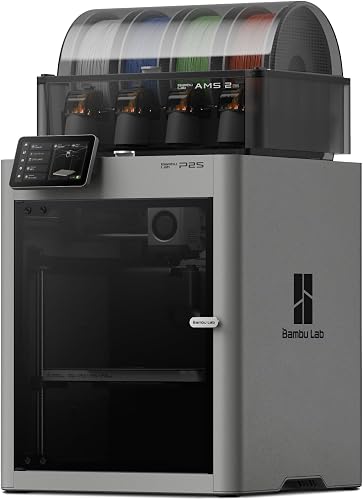
Most people should start with the Bambu Lab P2S Combo: enclosed, with a four-color AMS 2 Pro that dries filament and a 10-inch build cube. The Bambu Lab H2D AMS Combo adds dual nozzles and a heated chamber, the Creality K2 Plus Combo prints a 13.8-inch cube, and the Elegoo Centauri Carbon 2 Combo is the budget enclosed choice.
Buying a 3D printer in 2026 is easier than it used to be, and also more confusing. Almost every model now calibrates itself, but the choices that matter have multiplied: open frame or enclosed, one color or four, a single nozzle or two, and plastic filament or liquid resin. Spec sheets quote speeds that no real print reaches, and a printer that is perfect for desk toys can be useless for a cosplay helmet. We compared the specifications the makers publish, drew on the sources listed at the end and ranked ten printers by who each one suits. Where a maker leaves a figure out, we say so instead of guessing.
How to Choose a 3D Printer
Seven questions sort the field quickly. Answer them before you read the ranking.
Build volume. This is the largest part you can print in one piece. A 7-inch cube is fine for desk items, miniatures and organizers. A cosplay helmet needs roughly 10 to 12 inches, so the 10-inch printers are borderline and the 13.8-inch cube of the Creality K2 Plus Combo is comfortable. Larger parts can be split into sections and glued, which costs time and sanding.
Enclosed or open frame. An enclosure holds heat around the part, which keeps ABS and ASA from warping and cracking, and it blocks drafts. Open-frame printers are lighter, cheaper and perfectly good for PLA, PETG and TPU. Bambu Lab says plainly that it does not recommend enclosing the A1.
Multicolor and purge waste. Four-color systems let you print with several colors or materials in one job. Each color change flushes the old color, and that flushed filament is purge waste. Models with many color changes use more filament and take longer, so a multicolor system is a choice about how you want to print, not a free upgrade.
Materials. PLA is the easiest. PETG is tougher. TPU is flexible. ABS, ASA, nylon and polycarbonate need an enclosure and usually a hotter nozzle. Carbon-fiber and glass-fiber filaments are abrasive and call for a hardened steel nozzle. Check the maker’s own filament list.
Filament or resin. Filament printers melt plastic and suit most jobs. Resin printers cure liquid resin with ultraviolet light and give much finer detail, but they involve gloves, washing, curing and careful disposal. Only one of our ten, the Elegoo Saturn 4 Ultra 16K, is a resin printer.
Noise, fumes and ventilation. Makers publish decibel figures, but they are the makers’ own and do not capture fans and moving beds in your room. PLA is generally considered the easiest filament to use in a household. ABS, ASA and nylon release odor and fine particles, and a carbon filter traps only some of them. Give those materials a garage, workshop or spare room with real airflow.
Software and ecosystem. Each brand has its own slicer: Bambu Studio, Creality Print, ElegooSlicer. Many people also use OrcaSlicer. A large community means more ready-made profiles and more help when something goes wrong.
Prices change often, so we do not list them. Use the “See price on Amazon” buttons for current pricing, and read our profile of each printer for the details behind this ranking.
Comparison Table
#
Model
Technology
Build volume
Enclosed?
Multicolor system
Best for
1
Bambu Lab P2S Combo
Filament, CoreXY
10.1 x 10.1 x 10.1 in (256 mm per side)
Yes
AMS 2 Pro, 4 spools, with drying
Most people who want enclosed multicolor
2
Bambu Lab H2D AMS Combo
Filament, dual nozzle
13.8 x 12.6 x 12.8 in (350 x 320 x 325 mm)
Yes, heated chamber
AMS 2 Pro, 4 spools
Daily printing and engineering filaments
3
Creality K2 Plus Combo
Filament, CoreXY
13.8 x 13.8 x 13.8 in (350 mm per side)
Yes, heated chamber
CFS, 4 spools included, up to 16 colors
Large parts in one piece
4
Elegoo Centauri Carbon 2 Combo
Filament, CoreXY
10.1 x 10.1 x 10.1 in (256 mm per side)
Yes
CANVAS, 4 colors
Value enclosed multicolor
5
Anycubic Kobra S1 Combo
Filament, CoreXY
9.8 x 9.8 x 9.8 in (250 mm per side)
Yes
ACE 2 Pro, 4 spools, with drying
Multicolor with built-in drying
6
Bambu Lab A1 Combo
Filament, bed-slinger
10.1 x 10.1 x 10.1 in (256 mm per side)
No, open frame
AMS lite, 4 colors
Beginners, homes and classrooms
7
Flashforge AD5X
Filament, CoreXY
8.7 x 8.7 x 8.7 in (220 mm per side)
No, open frame
Integrated IFS, 4 colors
Low-cost multicolor CoreXY
8
Creality K1C
Filament, enclosed
Not confirmed on the pages we opened
Yes
None, single color
Functional parts and carbon-fiber filaments
9
Elegoo Saturn 4 Ultra 16K
Resin (MSLA)
8.33 x 4.66 x 8.66 in (211.68 x 118.37 x 220 mm)
Not applicable (resin)
None
Miniatures, figures and jewelry masters
10
Bambu Lab A1 mini
Filament, bed-slinger
7.1 x 7.1 x 7.1 in (180 mm per side)
No, open frame
None included, optional AMS lite
Desks, dorms and first printers
1. Bambu Lab P2S Combo — The Enclosed Multicolor Pick for Most People
According to Bambu Lab, the P2S is an enclosed CoreXY printer with a build volume of about 10 inches on each side (256 x 256 x 256 mm). The Combo adds the AMS 2 Pro, a four-spool feeder that Bambu says offers enhanced filament drying through an active venting system. That pairing is why it ranks first: it covers multicolor printing, dry filament and an enclosure in one purchase, without asking the owner to assemble a system from parts.
The details are sensible. Bambu lists a nozzle rated to 572 °F (300 °C), a bed up to 230 °F (110 °C), a quick-swap one-clip hotend, a built-in filament cutter, a 1080p camera and a 5-inch touchscreen. An Adaptive Airflow system with a carbon filter handles chamber air. Bambu Studio is a mature slicer with a large community, which matters more to a first-time owner than any peak speed.
The limits are clear. The 572 °F (300 °C) nozzle rules out the hottest engineering filaments, and multicolor prints create purge waste. On fumes, be honest with yourself: PLA is the easy case, but ABS and ASA release odor and fine particles even with a carbon filter, so give them a ventilated room. If you need much bigger prints or hotter materials, look at positions two and three. Read the full breakdown in our Bambu Lab P2S Combo profile.
2. Bambu Lab H2D AMS Combo — The Prosumer Printer for Daily Use
The H2D is the machine for someone who already knows they have outgrown a simple printer. Bambu Lab lists a dual-nozzle design with automatic offset calibration, a hotend rated to 662 °F (350 °C) and a 149 °F (65 °C) heated chamber. The Combo includes the AMS 2 Pro. A second nozzle can carry support material or a second color, which in principle means less purge waste in two-color prints.
The 13.8 x 12.6 x 12.8 in figure (350 x 320 x 325 mm) is the combined reach of both nozzles. Each nozzle covers its own side of the plate, so the area where both can print together is narrower, and a single-nozzle print gets a slightly different volume. Read that before you buy for one large part. The heated chamber and 662 °F (350 °C) hotend are what open the door to ABS, ASA, nylon, polycarbonate and fiber-filled filaments.
It ranks second because it is the most capable printer here for people who print daily, run a small shop or make functional parts, and it ranks behind the P2S because it is bigger, more complex and harder to fit into a home. Laser and cutting modules are sold separately and are not part of this Combo. Our Bambu Lab H2D AMS Combo profile explains the volume quirk in more detail.
3. Creality K2 Plus Combo — The Big-Print Specialist
Creality lists a 13.8-inch cube build volume (350 mm per side), which is the largest of the ten printers in this ranking. It pairs that with an actively heated chamber up to 140 °F (60 °C), a nozzle up to 662 °F (350 °C), two air filters and a 1080p chamber camera. The Combo includes one CFS multicolor unit with four spools, and Creality says the system can be expanded to 16 colors.
This is the printer for cosplayers, prop makers and anyone who prefers one large part to six glued pieces. Creality lists filaments from PLA and PETG to ABS, ASA and carbon-fiber nylon. The price of that space is physical: the printer weighs about 77 lb (35 kg) and measures roughly 19.5 by 20.3 by 25.2 inches, so unpacking is a two-person job and it needs a sturdy table.
It ranks third because most households do not need this much plate, and big prints take many hours. Its chamber is a little cooler than the H2D’s 149 °F (65 °C) and it has a single nozzle, but for size nothing else here comes close. See the Creality K2 Plus Combo profile.
4. Elegoo Centauri Carbon 2 Combo — The Value Enclosed Multicolor Pick
Elegoo lists an enclosed CoreXY printer with a 10.1-inch cube build volume (256 mm per side), a 662 °F (350 °C) hardened steel nozzle, a 230 °F (110 °C) bed and the four-color CANVAS system in the Combo. It also lists fully automated calibration, 31 sensors and a noise level under 45 dB, which is a claim from the maker rather than a measurement we can confirm. For a budget-tier printer, the hardened nozzle is rare, and Elegoo says it suits PC, PET and fiber-reinforced filaments.
Be realistic about color changes: each one flushes the old color, so models with many swaps waste filament and time. Elegoo’s page does not describe a built-in dryer for CANVAS, so plan to buy a separate filament dryer. Customer comments on the page are mixed about support, and we cannot verify them, so check the return terms where you buy.
It ranks fourth because it delivers much of the P2S’s feature list at a lower tier, with a less polished ecosystem. It does not list a heated chamber, so very warp-prone materials are better on the printers above it. Details are in our Elegoo Centauri Carbon 2 Combo profile.
5. Anycubic Kobra S1 Combo — Multicolor with Built-In Drying
Anycubic lists a fully enclosed CoreXY printer with a 9.8-inch cube of build space (250 mm per side), a 608 °F (320 °C) nozzle, a 248 °F (120 °C) bed and a maximum speed of 600 mm/s. The current combo ships with the ACE 2 Pro, a four-spool feeder that Anycubic says dries filament at up to 149 °F (65 °C) while the printer runs, and the system can be expanded to 16 colors.
Drying during printing matters because damp filament causes stringing, rough surfaces and weak parts, and PETG and nylon absorb moisture quickly. The trade-off is noise. Anycubic lists the printer at 46 dB or less in standard mode, but its footnote puts the ACE 2 Pro at 48 dB with the door closed and 55 dB with drying enabled, at a distance of 3 feet (1 meter). Run it in a spare room, not next to your desk.
It ranks fifth because the camera is a basic 480P and the 608 °F (320 °C) nozzle is cooler than the Elegoo’s 662 °F (350 °C), so it suits PLA, PETG, TPU, ABS and ASA better than fiber-filled engineering filaments. Our Anycubic Kobra S1 Combo profile has the full spec list.
6. Bambu Lab A1 Combo — The Beginner Multicolor Printer
The A1 is an open-frame bed-slinger with a 10.1-inch cube build volume (256 mm per side), and the Combo adds the four-color AMS lite. According to Bambu Lab, full-auto calibration handles Z-offset, bed leveling, vibration and nozzle pressure before each job, which removes most of the tuning that used to scare beginners off. Bambu lists active motor noise canceling and 49 dB operation, a figure we treat as the maker’s claim.
The catch is the open frame. Bambu lists PLA, PETG, TPU and PVA as supported, and says it does not recommend ABS, ASA, PC, nylon or carbon- and glass-fiber filaments. It also says it does not recommend enclosing the A1. The hotend reaches 572 °F (300 °C), and only one AMS lite is supported. The U.S. Consumer Product Safety Commission announced recall 24-264 in June 2024 for a heatbed cable on the A1, so confirm with your seller that the unit you buy is not affected.
It ranks sixth because it is the best open-frame choice for homes, families and classrooms that print PLA and PETG, while the five printers above it offer enclosures or bigger volumes. See the Bambu Lab A1 Combo profile.
7. Flashforge AD5X — The Low-Cost Multicolor CoreXY
Flashforge lists a CoreXY printer with an 8.7-inch cube build volume (220 mm per side) and an integrated four-color Intelligent Filament System, so there is no external box to find room for. It lists travel speeds up to 600 mm/s, acceleration up to 20,000 mm/s², a 572 °F (300 °C) extruder, a 230 °F (110 °C) bed and a filament list that includes PLA, PETG, TPU, PLA-CF and PETG-CF.
The frame is open, and Flashforge sells the enclosure as an expansion, so ABS, ASA and nylon are not on the filament list. The 8.7-inch cube will take figures, organizers and brackets but not a full-size helmet. The ecosystem is less developed than Bambu Lab’s.
It ranks seventh because it is the budget route to multicolor CoreXY motion, but it gives up volume, an enclosure and a built-in camera to get there. Our Flashforge AD5X profile compares it with its neighbors.
8. Creality K1C — The Enclosed Printer for Functional Parts
The K1C is an enclosed, single-color printer. Creality lists a filament range that includes PLA-CF, PA-CF, PET-CF, ABS, PLA, PETG, PET, TPU, PA, ASA and PC, a quick-swap nozzle kit, an AI camera and an activated carbon filter. Its pitch is functional work: brackets, clips, enclosures, jigs and car interior pieces.
Two honest caveats. First, the Creality pages we opened do not state the build volume, so we will not quote a figure from memory; check Creality’s specification page or manual against the largest part you plan to print. Second, it is single color as sold. Creality’s store page says a K1C 2025 is set to unlock multicolor with a new CFS, but we rank what is available today. Creality’s maintenance guide says the carbon filter should be replaced about every three months at eight hours a day, and notes that the filter traps only some particles.
It ranks eighth because color is not its job. If your projects are parts, not colors, it is a serious tool. Read the Creality K1C profile.
9. Elegoo Saturn 4 Ultra 16K — The Detail Specialist for Resin Printing
The Saturn 4 Ultra 16K is a resin (MSLA) printer with a 10-inch 16K monochrome LCD. Elegoo lists a 14 x 19 micron XY resolution and an 8.33 x 4.66 x 8.66 in build volume (211.68 x 118.37 x 220 mm). A tank heater keeps resin at 86 °F (30 °C), tilt release peels each layer, and an AI camera and Wi-Fi are included.
This is the printer for tabletop miniatures, action figures and jewelry masters, where surface finish matters more than speed or strength. It is also the only one here that needs a proper work routine. A public safety guide from MatterHackers recommends nitrile gloves, good ventilation, curing contaminated waste in UV light before disposal and never pouring uncured resin down the drain. Elegoo’s box includes gloves and a mask, but not resin, a wash station or a curing station.
It ranks ninth because it is a specialist tool, and it is not for kids, classrooms or shared rooms. Its parts are also not meant for heavy loads. See the Elegoo Saturn 4 Ultra 16K profile.
10. Bambu Lab A1 mini — The Smallest, Simplest Entry Point
Bambu Lab lists a 7.1-inch cube build volume (180 mm per side), a net weight of 12.1 lb (5.5 kg) and dimensions of 13.7 x 12.4 x 14.4 in (347 x 315 x 365 mm), so it fits on a desk. It ships pre-assembled and Bambu says it takes about 20 minutes to a first print. The hotend reaches 572 °F (300 °C), the bed 176 °F (80 °C), and the supported filaments are PLA, PETG, TPU and PVA. Multicolor is possible later by adding the optional AMS lite.
The 7-inch cube covers cable organizers, phone stands, controller grips and board game inserts, but not helmets or large props. The frame is open, and Bambu does not recommend ABS, ASA, nylon or fiber-filled filaments. It is a hot-nozzle machine with moving parts, so treat it as adult-run and supervise older children. CPSC recall 24-264 concerns the full-size A1, not the A1 mini.
It ranks last because it is the smallest, not because it is weak. For a dorm, an apartment or a first printer, it is the simplest way in. See the Bambu Lab A1 mini profile.
Which 3D Printer Should You Buy?
Here is the ranking again by use, in the same order.
Most People: Bambu Lab P2S Combo
Bambu Lab P2S Combo
Enclosed, with a four-spool AMS 2 Pro and filament drying in the box. The safest all-round choice if you want multicolor and an enclosure.
We rank by fit rather than cost, and we do not list prices because they change. The ranges below follow the badge each printer carries on this site, relative to the ten printers here. The Bambu Lab P2S Combo, Bambu Lab H2D AMS Combo and Creality K2 Plus Combo are premium, and the P2S is the most affordable of those three. The Elegoo Saturn 4 Ultra 16K, Bambu Lab A1 Combo, Creality K1C and Anycubic Kobra S1 Combo are mid-range. The Elegoo Centauri Carbon 2 Combo, Flashforge AD5X and Bambu Lab A1 mini are the budget tier. Check the current price on Amazon before you decide.
A Few Practical Tips
Measure your space first. The Creality K2 Plus Combo weighs 77 lb (35 kg) and the Anycubic Kobra S1 Combo about 40 lb (18 kg) before its ACE 2 Pro is added. Multicolor feeders add width on a desk.
Dry your filament. Damp filament causes stringing and weak parts. The Bambu Lab P2S Combo and Anycubic Kobra S1 Combo include drying in their feeders. For the others, a separate dryer is a good habit.
Match the printer to the material. Check the maker’s filament list before buying a roll of anything other than PLA.
Plan the airflow. A window, a garage or a spare room beats a bedroom for any material beyond PLA, and resin printing needs a ventilated space.
Check for recalls. The U.S. Consumer Product Safety Commission publishes recalls, including notice 24-264 for the Bambu Lab A1, so check before you buy.
Supervise children. Every filament printer has a hot nozzle and heated bed. Resin printers are not for children.
Conclusion
The Bambu Lab P2S Combo is the best starting point for most people because it combines an enclosure, four-color printing and filament drying in one package. The Bambu Lab H2D AMS Combo is the step up for daily printing and engineering filaments, and the Creality K2 Plus Combo is the answer when size is the problem. The Elegoo Centauri Carbon 2 Combo and Anycubic Kobra S1 Combo are enclosed multicolor alternatives, one for value and one for built-in drying. For open-frame printing, the Bambu Lab A1 Combo suits beginners and the Flashforge AD5X is the lowest-cost multicolor CoreXY. The Creality K1C is for functional parts, the Elegoo Saturn 4 Ultra 16K is for fine detail in resin, and the Bambu Lab A1 mini is the smallest, simplest way to start.
We rank the Bambu Lab P2S Combo first. It is enclosed, has a 10-inch cube of build space and includes the AMS 2 Pro four-spool system with filament drying, according to Bambu Lab. Its 572 °F (300 °C) nozzle is the main limit, and ABS or ASA still need a ventilated room.
Do I need an enclosed 3D printer?
Only if you plan to print ABS, ASA, nylon or carbon-fiber filaments, which warp or crack in open air. For PLA, PETG and TPU an open frame such as the Bambu Lab A1 Combo or A1 mini is enough. An enclosure also keeps drafts and curious fingers away from the hot parts.
Is multicolor printing worth it, and what is purge waste?
Multicolor is worth it if you want painted-looking models without painting. Every color change flushes the old color through the nozzle, and that discarded filament is purge waste. Models with many color changes use more filament and take longer. The dual-nozzle Bambu Lab H2D can keep two materials ready at once, which in principle means less purge waste in two-color prints.
Are 3D printers safe to run indoors?
PLA is generally considered the easiest filament to use in a household. ABS, ASA and nylon give off odor and fine particles, and a carbon filter only traps some of them. Print those in a garage, workshop or spare room with real airflow. Resin printers need more care: gloves, ventilation and proper disposal of uncured resin.
Should I buy a resin printer instead of a filament printer?
Choose resin, such as the Elegoo Saturn 4 Ultra 16K, only for fine detail like miniatures, figures and jewelry masters, and only if you have a ventilated place to work. For most households, brackets, toys, organizers and large props, a filament printer is simpler and cleaner.
What software do these printers use?
Bambu Lab printers use Bambu Studio, Creality printers use Creality Print and Elegoo's filament printer uses ElegooSlicer. Many owners also use OrcaSlicer. The Saturn 4 Ultra 16K is a resin printer and works with resin slicers such as Chitubox, which Elegoo mentions.