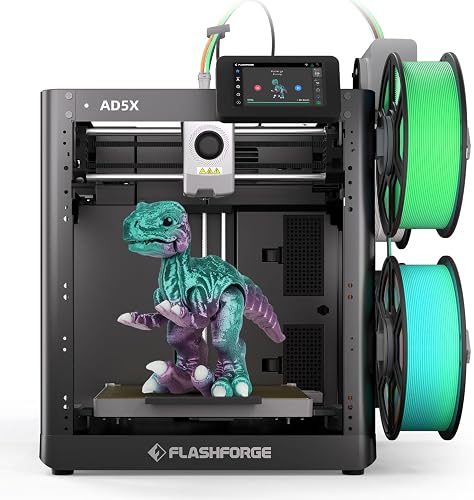
The Flashforge AD5X is the lowest-cost route to a multicolor CoreXY printer in our lineup. Instead of selling a printer and a separate filament changer, Flashforge builds a four-spool Intelligent Filament System (IFS) into the machine itself. That makes it compact for what it does, but it comes with trade-offs that matter: a smaller build volume than most rivals, an open frame, and a smaller software ecosystem than Bambu’s. We lay those out below so you can decide quickly whether it suits you.
We have not run this printer ourselves. This profile draws on Flashforge’s published specification table, product page and FAQ, and on our own reading of how those numbers translate to everyday use. Where Flashforge’s page is silent, we say so.
Who the Flashforge AD5X Is For
The AD5X fits a hobbyist who wants colorful prints on a budget: someone printing character models, desk toys, educational pieces or gifts, who values the idea of color changes handled by the machine. Flashforge pitches it as a beginner-friendly printer with one-click auto leveling, a 4.3-inch color touchscreen and a quick setup, and says you can be done in about ten minutes or less with three assembly steps: install the screen, the filament holder and the multicolor module.
It is also a reasonable second printer for someone who already owns a single-color machine and wants to add color without a big outlay. It is less suitable for anyone who wants to print ABS or ASA reliably, who needs large parts, or who wants a camera and enclosure built in.
On our site it is the budget multicolor pick. If you like the idea but want a larger bed and a long-established ecosystem, see the Bambu Lab A1 Combo.
The Integrated IFS
The headline feature is the IFS. Flashforge says it is included as a standard feature, fully integrated into the printer with no external feeder box. It automates filament switching, and the four spools sit side by side, which Flashforge says reduces storage space and allows flexible placement. When a single-color model uses up one spool, Flashforge says the printer switches automatically to the next.
Flashforge also states that, with each material switch, the nozzle is cleaned so edges stay clean without color mixing. Multicolor printing always produces some waste because each color change purges filament, and it lengthens print time. We would plan for both.
Flashforge argues that four colors cover most common multicolor needs and calls this “smarter color, no overkill.” That is marketing language, but the underlying point is fair: most household models use two to four colors, and the limits matter only if you need more. The IFS is designed for the AD5X; Flashforge’s FAQ says it is not compatible with the Adventurer 5M or 5M Pro.
Motion System and Speed
The AD5X is CoreXY, in which two motors drive the X and Y axes together. Flashforge says this keeps the print head stable on tall models and long jobs. It lists a maximum travel speed of 600 mm/s, a maximum print speed of 300 mm/s and a maximum acceleration of 20,000 mm/s². Travel speed is how fast the head moves when not extruding, so the print speed figure is the more relevant limit for actual printing. As with all such numbers, treat them as ceilings. Detailed models and color changes will run slower, and we have not verified any of it.
Flashforge also claims a 99 percent success rate resuming after a power outage, saying that CoreXY printers are better equipped for power-loss recovery. Take that as the maker’s own figure.
Build Volume
Flashforge lists a build volume of about 8.7 inches (220 mm) in each direction. That is plenty for figures, organizers, brackets and most household prints. It will not take a full-size helmet in one piece. Compared with the roughly 10-inch (256 mm) volume of the Bambu Lab A1 Combo, you give up room. If your prints are usually smaller than a dinner plate, you may never notice. The spec table also lists layer thickness of 0.1 to 0.4 mm and a 0.4 mm nozzle by default, with 0.25, 0.6 and 0.8 mm optional.
Materials: Better Than Many Open-Frame Printers
The spec table lists PETG, PLA, TPU95A (recommended for single-color printing), TPU 64D to 75D, PLA-CF and PETG-CF as supported. The extruder reaches 572 °F (300 °C) and the bed 230 °F (110 °C), and the build plate is a PEI flexible steel sheet. Flashforge’s product page also describes multicolor TPU 64D printing for flexible parts such as wearable pieces and soft figurines.
The list leaves out ABS, ASA, nylon and polycarbonate. The printer is open frame and there is no air filtration listed, so those materials are not what this machine is for. Flashforge sells an enclosure kit as a separate accessory, and the page lists chamber lighting and remote monitoring as expandable, which tells us they are not built in. We could not confirm from the page whether the enclosure kit makes ABS practical, so we would not buy it with that expectation. Flashforge also lists carbon-fiber-filled PLA-CF and PETG-CF; check whether the nozzle assembly you have is suited to abrasive filaments before you run a whole spool.
Software and Connectivity
Flashforge lists Orca-Flashforge and Orca Slicer as compatible slicing software, and connectivity over USB, Ethernet and Wi-Fi. It also describes multi-device management and a Flash Maker option for managing several printers. This is less polished than Bambu’s integrated ecosystem of slicer, model library and phone app, but OrcaSlicer is a well-known open-source slicer, which gives you a way out of any single vendor’s software.
Noise and Indoor Use
Flashforge’s page does not give a noise figure, so we will not guess. As an open-frame printer with fans and a CoreXY head moving at speed, it will be audible in a quiet room. Air filtration is listed as not included. For PLA and PETG, ventilate the room as you would for any desktop printer, and do not put it next to a bed. Because there is no enclosure by default, hands can reach the hot nozzle and bed, so supervise young users and treat it as an adult-run machine.
Ownership
Flashforge says it offers a one-year limited warranty on its 3D printers and a three-month warranty on extruder parts, with a 30-day return window and free shipping on its own store. Conditions at other retailers may differ. The page describes a quick-release nozzle that Flashforge says was adjusted from the 5M series to reduce cost by 30 percent, and lists accessories such as a nozzle assembly, textured PEI build plate, extruder assembly, touch screen assembly and the enclosure kit. Parts being listed on the maker’s own page is a good sign for long-term ownership, though we cannot say how quickly they ship.
Flashforge’s FAQ also notes that the AD5X mainboard and nozzle are not interchangeable with the Adventurer 5M, so parts for older models will not fit.
Who Should Skip It
- You want a camera and enclosure built in. Flashforge lists chamber lighting and remote monitoring as expandable. An enclosed model such as the Creality K1C includes an AI camera.
- You want to print ABS, ASA or nylon. The filament list does not include them.
- You need more than 8.7 inches in any direction. Look at the 10-inch printers in our ranking of the best 3D printers of 2026.
- You want the most polished slicer and phone app experience. The Bambu Lab A1 Combo is built around that.
How It Compares
Against the A1 Combo, the AD5X offers CoreXY motion, a hotter bed (230 °F against 212 °F, or 110 °C against 100 °C, per each maker) and a built-in IFS, but a smaller volume and a less developed ecosystem. Against the K1C, it adds multicolor and drops the enclosure, camera and carbon filter.
Final Take
The Flashforge AD5X makes multicolor CoreXY printing accessible at the budget tier. The built-in four-color IFS, fast motion, a 572 °F (300 °C) extruder and a TPU-friendly filament list are real strengths. The 8.7-inch volume, the open frame, the optional enclosure and the smaller software ecosystem are the trade-offs. If you want color on a budget and will mostly print PLA, PETG and TPU, it is a strong candidate.
See price on Amazon
To see how it stacks up against the other nine printers, read our ranking of the best 3D printers of 2026.
Sources