We earn a commission if you buy through our links, at no extra cost to you.
Best 3D Printer for Beginners: Adult First-Timers
What to know before your first 3D printer: auto calibration, open vs enclosed, single vs multicolor, slicers, first filaments, and five beginner-friendly models.
At a glance
For a first 3D printer, the Bambu Lab A1 Combo gives self-calibration and four colors with the least fuss. The Bambu Lab A1 mini is the smaller single-color start, the Bambu Lab P2S Combo is the enclosed step up, and the Elegoo Centauri Carbon 2 Combo is the enclosed budget option.


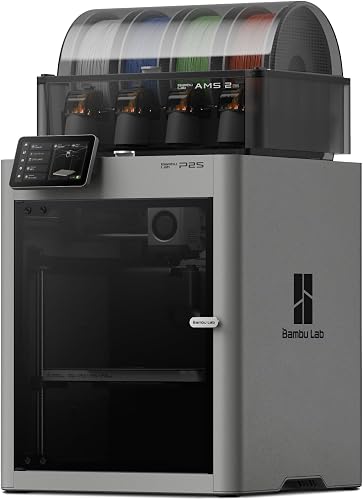
Buying your first 3D printer used to mean weekends of leveling a bed, replacing parts and reading forum threads. That has changed. Several current models calibrate themselves, ship nearly assembled and start a print from a phone or a computer in under an hour. The remaining questions are about fit: how much room you have, whether you want color, and what you plan to make. This guide answers those in plain words and then matches five models from the site to the kind of beginner you are.
We do not test products. All figures below are the makers’ own, from their pages, and we say where a page is silent.
What “Auto Calibration” Really Removes
Older printers asked you to level the bed by turning screws, set the gap between nozzle and plate by hand and tune the flow of plastic. Those steps are where many beginners quit. Bambu says its A1 printers calibrate Z-offset, bed level, vibration resonance and nozzle pressure for every print job. Elegoo lists fully automated calibration for the Centauri Carbon 2, and Flashforge lists one-click auto leveling for the AD5X.
What it does not remove: keeping the build plate clean, storing filament dry, choosing models that print well and learning why a print fails. Think of auto calibration as removing the mechanical chores, not the learning.
Open Frame or Enclosed
An open-frame printer, such as the Bambu Lab A1 family and the Flashforge AD5X, has no walls. It is lighter, simpler and usually cheaper, and it handles PLA, PETG and TPU well. Bambu does not recommend ABS, ASA, PC or nylon on the open A1 models, because the open frame and lower chamber temperature raise the risk of weak layers and warping.
An enclosed printer, such as the Bambu Lab P2S Combo and the Elegoo Centauri Carbon 2 Combo, keeps heat steady and drafts out, which helps filaments that curl in a cool room. It also puts a barrier around the hot, moving parts. The cost is size, weight and usually a higher price tier.
For a first printer that will mostly make PLA toys, organizers and household fixes, open frame is a sensible choice. If you already know you want tougher materials, buy the enclosed one now.
Bed-Slinger or CoreXY in Plain Words
In a bed-slinger, the build plate moves back and forth under the nozzle. It is mechanically simple, and it is how the Bambu Lab A1 line works. Very tall or heavy prints can limit how hard you can push speed, but for everyday prints you will not notice.
In a CoreXY printer, the toolhead moves in X and Y while the bed only moves up and down. Flashforge says this keeps the head stable on tall models and long jobs. The P2S, Centauri Carbon 2 and AD5X are CoreXY. Both designs work well for beginners. Pick on the other factors in this guide instead.
Single Color or Multicolor
Multicolor printers feed several spools and swap between them during a print. The appeal is obvious, and it is fun. The costs are also real: every change flushes some of the old color, so a model with many swaps wastes filament and takes longer. Elegoo’s own page carries customer comments that color swaps take half a minute to a minute and can generate a lot of waste.
Our advice: if you know color is the point, buy a printer with a system included. If you are not sure, start single-color. Most people print one color of PLA for a long time, and the Bambu Lab A1 mini can add the optional AMS lite later.
Slicers: The Software You Will Actually Use
A slicer turns a 3D model into instructions for the printer. You will use it every time. Bambu Lab printers use Bambu Studio, Elegoo has ElegooSlicer, and Creality has Creality Print. OrcaSlicer is a popular alternative, and PrusaSlicer is another well-known option. Free model libraries such as MakerWorld, Printables and Thingiverse give you models to print in your first month, which is when you are still learning what a good model looks like.
First Filaments and a First-Week Checklist
PLA is where you start. It is the most common home filament and generally considered the easiest on a household. PETG is the usual second step for stronger, more heat-tolerant parts. TPU is flexible and trickier. Keep filament dry, because damp spools cause stringing and weak parts.
Your first week:
- Unbox, remove shipping restraints and follow the maker’s setup steps.
- Start with a small, simple model before anything ambitious.
- Watch the first layer of every print for the first few days.
- Wipe the plate with the recommended cleaner before each print.
- Print something you will use, such as a phone stand, to stay motivated.
- Keep a few spare nozzles and a scraper on hand.
The Two Failures You Will Meet First
Bed adhesion. The print lifts or never sticks. Usual causes: a dirty plate, a first layer that is not pressed down enough, or a draft. Clean the plate, check the first layer and keep drafts away.
Stringing. Thin hairs of plastic across gaps. Usual cause: damp filament or too high a nozzle temperature. Dry the spool and try the slicer’s recommended profile for that filament.
Both are normal. Treat them as lessons, not defects.
An Honest Word About Printers Under $100
Searches for “3D printer under $100” are common. We do not list one, and we would not pick one for a beginner. At that level, expect kits you must assemble, a bed to level by hand and a long list of adjustments. If your budget is that low, wait, or look for a refurbished self-calibrating model and check any used printer’s recall status first. Our picks start at what we call the budget tier of self-calibrating printers.
Noise, Fumes and Where to Put It
Put the printer on a sturdy table in a room with airflow. Makers list noise figures such as 49 dB for the Bambu A1 models and under 45 dB for the Elegoo Centauri Carbon 2, but those are maker numbers that do not capture every sound of a long print. UL Research Institutes’ Chemical Insights team says material extrusion printers emit a mix of ultrafine particles and volatile organic compounds and that exposure may exceed recommended limits, so ventilate the room, stay with PLA while you learn and keep the printer out of your bedroom.
Five Models for First-Time Buyers
For the full lineup, see our 3D printer comparison.
Bambu Lab A1 Combo: The Friendly Multicolor Start
A mid-range open-frame printer with a 10-inch build volume, full-auto calibration and four-color AMS lite included. The easiest path from box to first print.
According to Bambu, the A1 has a roughly 10-inch (256 x 256 x 256 mm) build volume, calibrates itself and integrates with the MakerWorld library. The Combo adds the AMS lite for four colors. It supports PLA, PETG and TPU and does not recommend ABS or ASA. Only one AMS lite works with it, so four colors is the cap. The CPSC announced recall 24-264 in June 2024 covering a heatbed cable on early A1 units, identified by serial number, so check a used unit. See the Bambu Lab A1 Combo profile.
Bambu Lab A1 mini: The Smaller, Simpler Option
A compact budget printer for desks, dorms and apartments. Single-color out of the box, with optional AMS lite later.
Bambu lists a 7.1-inch (180 x 180 x 180 mm) build volume, about 20 minutes to set up for a first print, a 572 °F (300 °C) hotend and a 176 °F (80 °C) bed. The volume suits phone stands, organizers and small figures and rules out large prints. Our Bambu Lab A1 mini profile has the details.
Bambu Lab P2S Combo: Enclosed and Low-Fuss
A premium enclosed CoreXY printer with AMS 2 Pro filament drying. Pick it when you want the smoothest experience and room to grow.
According to Bambu, the P2S has a 10-inch (256 mm) cube of build space, a 572 °F (300 °C) nozzle, a 230 °F (110 °C) bed, a 1080p camera, a 5-inch touchscreen and a quick-swap hotend. The AMS 2 Pro includes active filament drying. It is the most affordable of the three premium printers on the site, but still the highest tier here. See the Bambu Lab P2S Combo profile.
Elegoo Centauri Carbon 2 Combo: Enclosed on a Budget

A budget enclosed CoreXY printer with four-color CANVAS and a hardened steel nozzle. For beginners willing to troubleshoot a little.
Elegoo lists a 10-inch (256 mm) cube, a 662 °F (350 °C) nozzle, a 230 °F (110 °C) bed, an enclosed chamber and operation under 45 dB. Its page does not describe a built-in dryer, and customer comments on support are mixed. See the Elegoo Centauri Carbon 2 Combo profile.
Flashforge AD5X: Multicolor at the Lowest Cost

A budget CoreXY printer with a built-in four-spool system and a 4.3-inch touchscreen. A fit if you want color and can live with an open frame.
Flashforge lists an 8.7-inch (220 mm) build volume and says setup takes about ten minutes or less. It has a smaller software ecosystem than Bambu’s. See the Flashforge AD5X profile.
Which One Should You Pick?
| If you want | Pick |
|---|---|
| The easiest first color printer | Bambu Lab A1 Combo |
| The smallest and simplest | Bambu Lab A1 mini |
| Enclosed with the smoothest experience | Bambu Lab P2S Combo |
| Enclosed on a budget | Elegoo Centauri Carbon 2 Combo |
| The lowest-cost multicolor | Flashforge AD5X |
Sources
- Bambu Lab A1 official product page
- Bambu Lab A1 mini official product page
- Bambu Lab blog: meet the P2S
- Elegoo Centauri Carbon 2 Combo official product page
- Flashforge AD5X official product page
- UL Research Institutes: Comprehensive emissions data from material extrusion 3D printing
- CPSC recall 24-264: Bambu Lab Recalls A1 3D Printers Due to Electric Shock and Fire Hazards
Frequently asked questions
Can I get a good 3D printer for under $100?
Not one we would recommend to a first-timer. The printers on this site sit well above that line, and we do not list any machine at that level. Very cheap kits tend to need assembly, manual bed leveling and a lot of tinkering, which is the opposite of what most beginners want. A realistic first budget for a self-calibrating printer is a few hundred dollars.
Do I need multicolor for my first printer?
No. Most people print single-color PLA for months before wanting more. Multicolor adds filament waste, because each color change purges some, and it lengthens prints. The Bambu Lab A1 mini is single-color out of the box and can add the optional AMS lite later, so you keep the option open.
What does auto calibration actually do?
It handles setup steps that used to frustrate beginners. Bambu says the A1 calibrates Z-offset, bed level, vibration resonance and nozzle pressure for every print job. You still keep the build plate clean, store filament dry and pick sensible models, because no printer removes the learning curve.
Which slicer should I start with?
Start with the one made for your printer: Bambu Studio for Bambu Lab, ElegooSlicer for Elegoo, Creality Print for Creality. OrcaSlicer is a popular alternative that several of these printers also work with, and PrusaSlicer is another widely used option. Check your printer's compatibility before you rely on a third-party slicer.
Is it safe to run a 3D printer in an apartment?
PLA is the friendliest filament indoors, but printers still produce fine particles and some fumes. UL Research Institutes' Chemical Insights team says material extrusion printers may present hazardous pollution exposure and exposure may exceed recommended limits. Keep the room ventilated, keep the printer away from where you sleep, and stay with PLA while you learn.
Open frame or enclosed for a beginner?
Open frame is fine if you print PLA, PETG and TPU and want the lowest cost and simplest setup. Choose an enclosed printer such as the Bambu Lab P2S Combo or Elegoo Centauri Carbon 2 Combo if you want steadier temperatures, a barrier around the hot parts, or plan to try materials like ABS later.